dreamscripts-docs
Dream Elevator
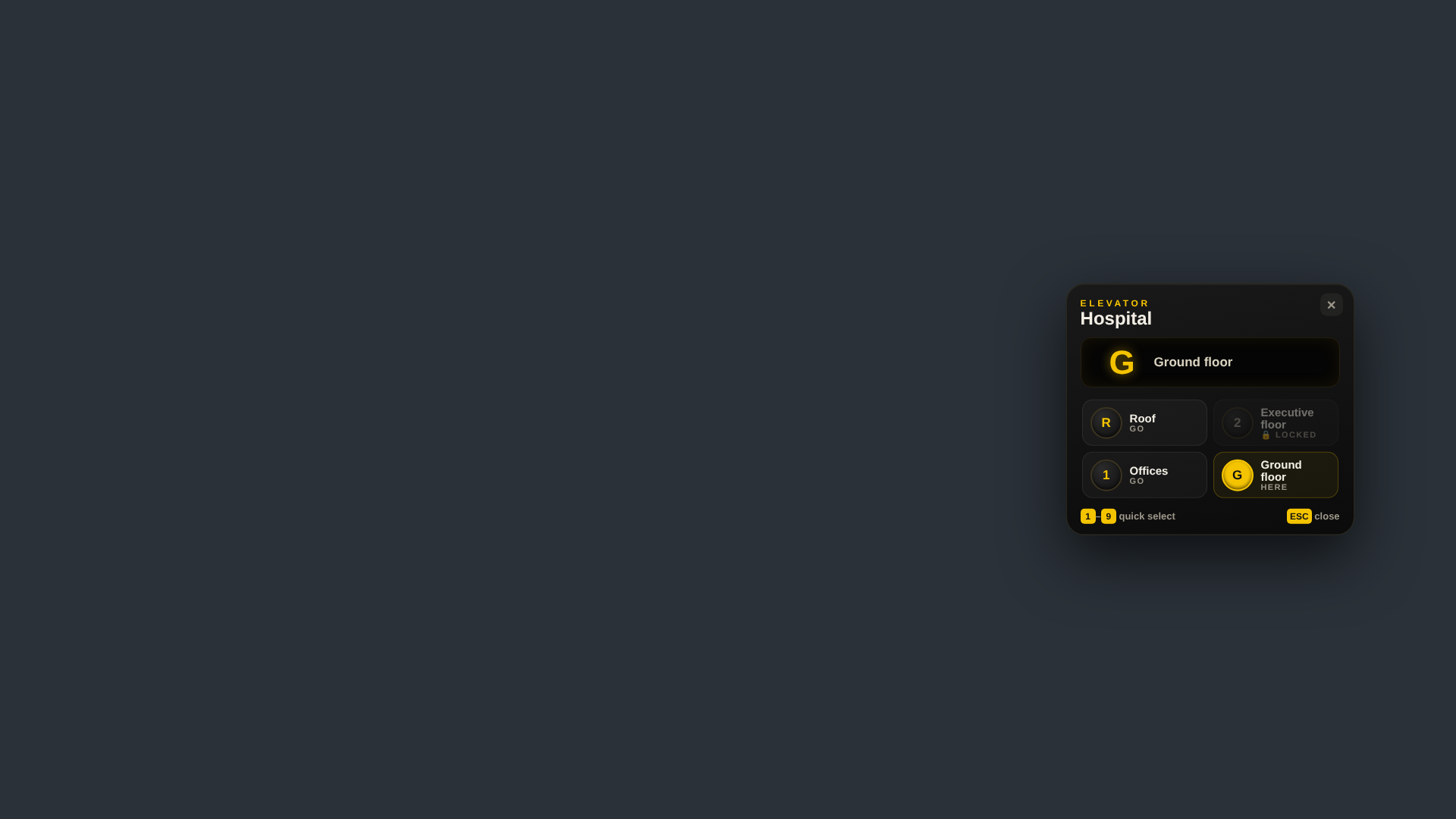
Elevators and teleporters for ESX servers. Players pick any floor directly on a panel that looks like a real elevator. Elevators are built in game with an editor, no coordinates in config files.
Built with AI assistance, tested on our live roleplay server DreamRP (ESX Legacy). Other frameworks are marked as beta where they apply. Version 1.1.2 (from
fxmanifest.lua). Resource folder:dream_fahrstuhl.
Features
- Elevator panel with all floors, highest floor on top, direct selection by keyboard (floor code, 1-9)
- Ride with fade-out, floor counter and an arrival sound generated in the interface (no sound files)
- Ride along: players standing next to you get “[E] Ride along” for a few seconds
- Vehicle lifts (for example an underground car park): the driver rides with the car and its passengers
- Job access for a whole elevator or for single floors, restricted elevators are invisible for everyone else
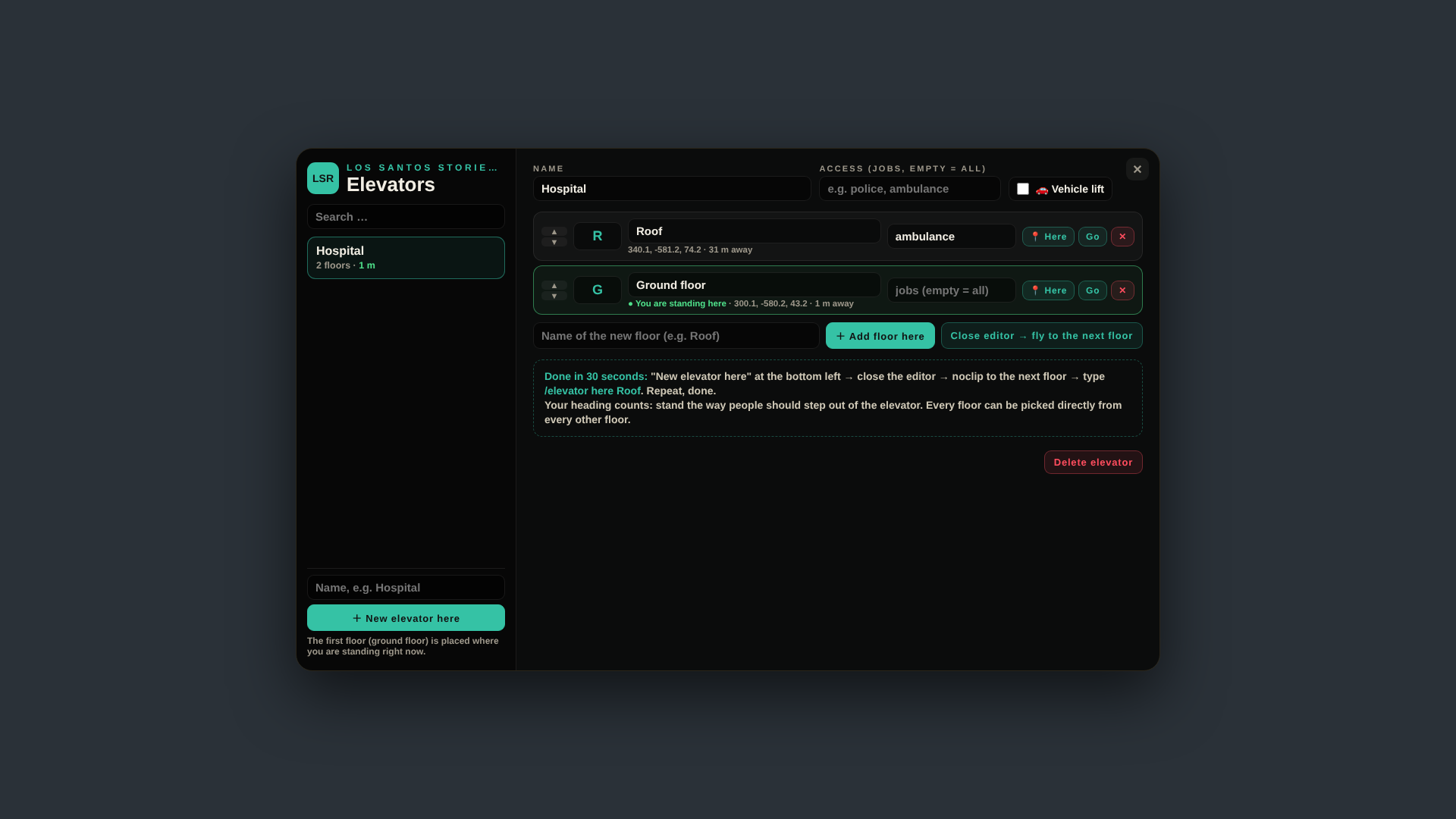
- In-game editor for admins: create, rename, floor codes, order, reposition, test ride, delete
- The server checks distance, access and cooldown of every ride
- Elevators are stored in the database, the table is created automatically
- Colours in
Config.Theme
Requirements
es_extended(ESX Legacy)oxmysqlesx_textui(ships with ESX Legacy, used for the “[E]” prompt throughESX.TextUI)
es_extended and oxmysql are listed under dependencies in fxmanifest.lua. The resource folder is named dream_fahrstuhl (kept for compatibility with existing installations), the product name is Dream Elevator.
Installation
- Put the folder
dream_fahrstuhlinto yourresourcesfolder. Do not rename it. - Add
ensure dream_fahrstuhlto yourserver.cfg, afteres_extended,esx_textuiandoxmysql. - Edit
config.lua(admin groups, distances, theme). - Start the server. The table
dream_fahrstuhlis created automatically, no SQL import needed.
Building an elevator (admins):
- Stand where the ground floor should be, facing the direction players should look after arriving.
/elevator new Hospitalcreates the elevator with its first floor (G) at your position.- Go to the next floor and type
/elevator here Roof. Repeat for every floor. /elevatoropens the editor: rename, floor codes, order, job access, vehicle lift, test ride, delete.
Configuration
Main file: config.lua. Texts: locales.lua.
| Option | Default | Meaning |
|---|---|---|
Config.Locale |
'en' |
'en' or 'de' |
Config.Command |
'elevator' |
Admin command for the editor |
Config.LegacyCommand |
false |
true re-enables the old German command /fahrstuhl |
Config.AdminGroups |
admin, superadmin |
ESX groups that may build elevators |
Config.AdminAce |
'dream_fahrstuhl.admin' |
ACE permission for the editor |
Config.UseDistance |
1.6 |
Distance for [E] |
Config.VehicleDistance |
5.0 |
Distance for vehicle lifts |
Config.DrawDistance |
18.0 |
Marker visibility |
Config.TravelBase / TravelPerFloor / TravelMax |
1400 / 350 / 3800 ms |
Ride duration |
Config.Cooldown |
3 |
Seconds between two rides |
Config.Sound / Config.Volume |
true / 0.35 |
Arrival sound |
Config.RideAlong |
Enabled true, Radius 2.5, Seconds 7 |
Ride along |
Config.Notify |
'esx' |
'esx' or 'custom' |
Config.Theme |
gold accent | Colours, logo letters, server name |
Commands and keys
- Key E at a floor marker: open the panel
/elevator: open the editor (admins)/elevator new <name>: new elevator, first floor at your position/elevator here <name>: add a floor at your position to the elevator you edited last (or the nearest one)
Exports and events
None for other resources.
Localization
English (default) and German via Config.Locale. All panel, editor and notification texts are in locales.lua. New elevators get English default floor names in English mode (Ground floor / G, Floor 1, …). Existing elevators in the database are not changed.
Performance
Resmon values are estimated from the code, set low on purpose (not measured on every server setup): idle roughly 0.00-0.01 ms. Values rise briefly while the interface is open or while the script handles a request. Please check resmon on your own server.
FAQ and troubleshooting
I cannot open the editor. Your ESX group must be in Config.AdminGroups, or give the ACE permission: add_ace group.admin dream_fahrstuhl.admin allow.
An elevator is invisible. Elevators with job access are invisible for everyone without that job.
/fahrstuhl does not work any more. The old German command is off by default since 1.1.2. Set Config.LegacyCommand = true.
Players cannot ride again immediately. Config.Cooldown (default 3 seconds) applies, the server checks it.
Vehicle lift does not take the car. The driver must be within Config.VehicleDistance (default 5 m) of the floor point.
Support
- Support Discord: https://discord.gg/XhHQkkXkFW
- Store: https://dreamscripts.tebex.store
- All documentation: DreamScripts Docs
Changelog (short)
- 1.1.2: ESX object is local, editor permission also by ACE (
Config.AdminAce), old German command off by default. - 1.1.1: English default language,
Config.Command, English sub-commands. - 1.1.0: Sale release.
Full changelog: CHANGELOG.md inside the resource.